A hands-on walkthrough of the object that stands between your files and your tables. By the end you will have created an external stage over a public S3 bucket, inspected the files without loading them, inferred their schema, loaded them into a table, queried the same files in place as an external table, and handed the whole thing off to Snowpipe.
Table of Contents
The pipeline nobody has to touch
The best data pipeline is the one you forget you built. A pipeline that needs a person to log in, download a file, and click “run” is not a pipeline — it is a recurring meeting with extra steps. It fails silently when that person is on vacation and has no audit trail beyond tribal knowledge.
Automated pipelines come in two flavors.
- Schedule-driven pipelines run on a clock — nightly, hourly, every fifteen minutes.
- Event-driven pipelines run when a file lands in cloud storage or a message hits a queue, but notifications need to be configured.
Where stages fit
A stage manages where your files live and how Snowflake reads them.
- Stages move data both directions. Loading is the overwhelming majority of what stages are used for.
- Unloading exists for real reasons.
- Extracts for partners not on Snowflake, archives, feeding downstream systems.
The four kinds of stage
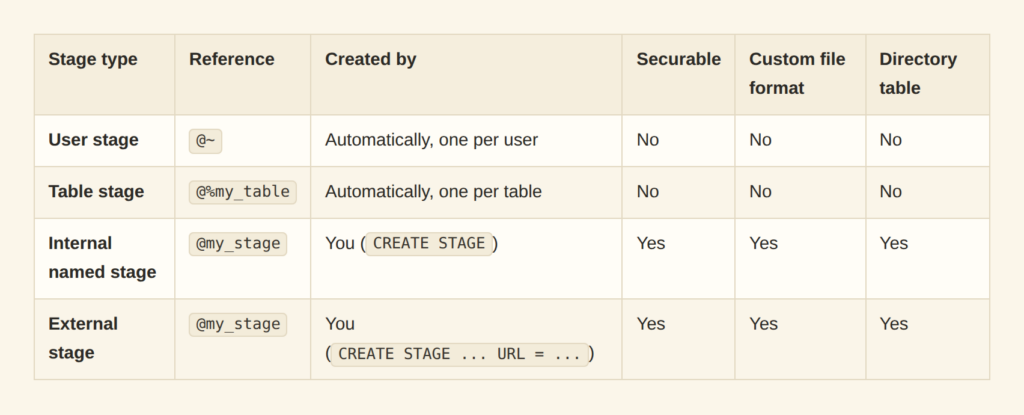
The first three are internal.
- Snowflake provisions and manages the storage, compressing and encrypting whatever you put there.
- The fourth is external and points at storage you already in S3, Azure Blob Storage, or GCS.
Why external stages win
The internal stages have real ceilings.
- A user stage (
@~) is a personal scratch space — one per user, invisible to everyone else, and it cannot be altered, dropped, or granted to anyone. - A table stage (
@%orders_table) is bolted to exactly one table, has no privileges of its own, and cannot have a file format attached, so everyCOPYmust spell the format out inline. - An internal named stage fixes the governance problems (real grants, its own file format, directory tables).
The question for Internal Stages is how do the files get there?
- Files reach an internal stage only via
PUTfrom a client — SnowSQL, a driver, Snowsight. - Something outside Snowflake has to reach in and upload, which is a person, or a server you now have to build, monitor, and secure.
External stages already use your cloud storage that store application logs, vendor drops, SaaS exports, and IoT feeds.
Before you begin
You need a Snowflake account, a running warehouse, and a role that can create stages, file formats, tables, and pipes.
-- Choose a database and schema
USE SCHEMA snowflake_learning_db.public;
Create an external stage
A note on the bucket we're using
The Citi Bike trip data lives in a public S3 bucket.
- Public means no credentials, no IAM role, no trust relationship.
- This is great for learning, but any private data should be integrated through a
STORAGE INTEGRATION.
Without one, the secret lives in SQL:
-- Don't do this in anything that matters.
CREATE STAGE claims_inbound
URL = 's3://enterprise-claims/inbound/'
CREDENTIALS = (AWS_KEY_ID = 'AKIA...' AWS_SECRET_KEY = 'wJal...');
With an integration, no secret appears in SQL at all:
CREATE STORAGE INTEGRATION s3_int
TYPE = EXTERNAL_STAGE
STORAGE_PROVIDER = 'S3'
ENABLED = TRUE
STORAGE_AWS_ROLE_ARN = 'arn:aws:iam::123456789012:role/snowflake-ingest'
STORAGE_ALLOWED_LOCATIONS = ('s3://enterprise-claims/inbound/');
CREATE STAGE claims_inbound
URL = 's3://enterprise-claims/inbound/'
STORAGE_INTEGRATION = s3_int
FILE_FORMAT = my_csv_format;
GRANT USAGE ON STAGE claims_inbound TO ROLE ingest_engineer;
Creating an integration requires
ACCOUNTADMIN
or
CREATE INTEGRATION
.
Keep the cloud and the region together
- Put your storage in the same cloud provider and region as your Snowflake account whenever you can.
- Reads stay on the provider’s internal network, so latency is lower and throughput higher, and you avoid data transfer charges.
- Providers bill egress when bytes leave a region or the provider entirely, in both directions, for both loading and unloading.
The URL is what makes it external
-
CREATE STAGEbuilds an internal named stage by default. - Adding a
URLsimply points at storage that already exists in cloud storage.
CREATE OR REPLACE STAGE bike_trips_external_stage
URL = 's3://snowflake-workshop-lab/citibike-trips-csv/'
DIRECTORY = (ENABLE = TRUE);
Two ways to see what's in there
DIRECTORY = (ENABLE = TRUE)
attaches a directory table, allowing you to query the data within a stages as if it were a Snowflake table.
SELECT * FROM DIRECTORY(@bike_trips_external_stage);
However, there is also a simple tool:
LS @bike_trips_external_stage;
LS
(or
LIST
) returns name, size, MD5, and last-modified for every visible file, and runs without a warehouse.
Now the queryable version, which returns
RELATIVE_PATH
,
SIZE
,
LAST_MODIFIED
,
MD5
,
ETAG
, and
FILE_URL
as a proper result set:
SELECT RELATIVE_PATH, SIZE, LAST_MODIFIED
FROM DIRECTORY(@bike_trips_external_stage)
WHERE RELATIVE_PATH LIKE '2020/%'
ORDER BY LAST_MODIFIED DESC;
Explore the data before you load it
- A genuinely useful property of a stage is that you can run SQL against files still sitting in cloud storage.
- You do not have to load data first to look at it.
- So, you can find the problem before it becomes rows you have to clean up.
Tell Snowflake what the files look like
A
FILE FORMAT
describes how to parse the file including type, compression, delimiter, null representation.
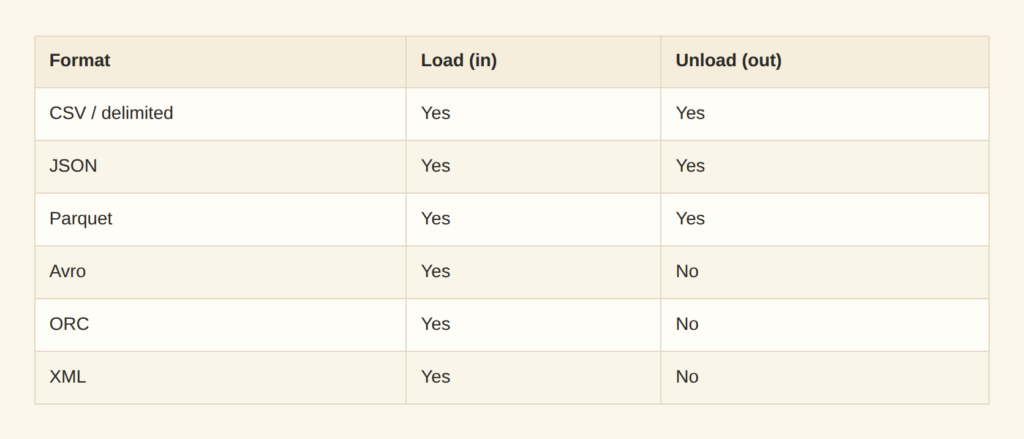
CREATE OR REPLACE FILE FORMAT bike_trips_csv_file_format
TYPE = 'CSV'
COMPRESSION = 'GZIP';
Let Snowflake work out the details
Writing a
CREATE TABLE
against a file with multiple columns that you have never seen before may lead to errors. The
INFER_SCHEMA
function reads a sample of staged files and reports the columns and it column data types.
SELECT *
FROM TABLE(
INFER_SCHEMA(
LOCATION => '@bike_trips_external_stage/2020/data_0_0_0.csv.gz',
FILE_FORMAT => 'bike_trips_csv_file_format'
)
);
A few reminders when working with different file formats:
- CSV is positional and flat, so one representative file usually characterizes the set — but a column that is numeric in January and contains
"N/A"in March will be inferred as a number, and March will fail to load. - JSON is the opposite: fields are optional, nesting varies, and a key appearing in one record in ten thousand will not be in your sample.
- Parquet, Avro, and ORC carry their schema in the file, so inference reads metadata rather than guessing, but files written at different times can disagree.
Look at the actual rows
Schema inference tells you the shape; a
SELECT
tells you the truth. You can query a staged file directly, before a single row enters a table:
SELECT
$1::INT           AS trip_id,
$2::TIMESTAMP_NTZ AS start_time,
$3::TIMESTAMP_NTZ AS stop_time,
$4::INT           AS trip_duration,
$5::INT           AS start_station_id,
$6::INT           AS end_station_id,
$7::VARCHAR       AS rider_id,
$8::VARCHAR       AS bike_type,
$9::INT           AS bike_id,
$10::VARCHAR      AS rider_name,
$11::DATE         AS birth_date,
$12::VARCHAR      AS gender,
$13::VARCHAR      AS membership_type,
$14::VARCHAR      AS access_method,
$15::VARCHAR      AS device_type
FROM
@bike_trips_external_stage/2020/data_0_0_0.csv.gz
LIMIT 5;

$1
through
$15
are positional references. The
::
casts convert columns into their appropriate data types.
This pre-flight habit is worth building. Alongside a row count, select the
METADATA$
pseudocolumns available on any staged file:
SELECT METADATA$FILENAME, METADATA$FILE_ROW_NUMBER, $1, $2
FROM @bike_trips_external_stage/2020/
(FILE_FORMAT => 'bike_trips_csv_file_format')
LIMIT 20;
Loading
METADATA$FILENAME
and
METADATA$FILE_ROW_NUMBER
into your target table alongside the real columns gives every row file-level provenance — which turns “the load broke, but which files?” from an archaeology project into a
WHERE
clause.
Land the data in a table
Create the target
COPY INTO
does not create tables and does not infer schema; the target must exist first. This is the inferred schema from section 4, in the same column order as the files, with the positional
C
n names replaced by meaningful ones:
CREATE TABLE IF NOT EXISTS bike_trips (
trip_id           INT,
start_time        TIMESTAMP_NTZ,
stop_time         TIMESTAMP_NTZ,
trip_duration     INT,
start_station_id  INT,
end_station_id    INT,
rider_id          VARCHAR,
bike_type         VARCHAR,
bike_id           INT,
rider_name        VARCHAR,
birth_date        DATE,
gender            VARCHAR,
membership_type   VARCHAR,
access_method     VARCHAR,
device_type       VARCHAR
);
Rehearse the load with VALIDATION_MODE
Before moving any data, run the load in rehearsal:
COPY INTO bike_trips
FROM @bike_trips_external_stage/2020/
FILE_FORMAT = (FORMAT_NAME = 'bike_trips_csv_file_format')
VALIDATION_MODE = RETURN_ERRORS;
-
VALIDATION_MODEparses and validates every record without writing anything to the table, returning the errors it found including the file, row number, column, and offending value.
Decide what “failure” means
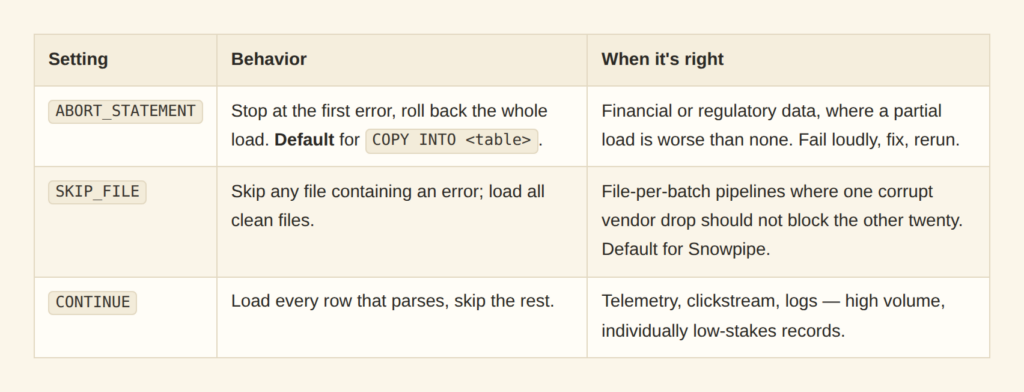
However,
ON_ERROR
tells Snowflake what to do about it when you load the data for real.
COPY INTO bike_trips
FROM @bike_trips_external_stage/2020/
FILE_FORMAT = (FORMAT_NAME = 'bike_trips_csv_file_format')
ON_ERROR = SKIP_FILE;
Why the second COPY loads nothing
- Snowflake records which files have already been loaded into which table, by path and content, and keeps that history for 64 days.
- Files are skipped, which is what makes re-running after a partial failure safe — reissue the same command and only the missing files get processed.
The escape hatch is
FORCE = TRUE
, which reloads everything and duplicates whatever was already there. Reach for it only when you have deliberately truncated the target.
Or don't load it at all: external tables
Everything so far assumed you want the data inside Snowflake, and usually you do. Loading reorganizes rows into micro-partitions: compressed, columnar, annotated with per-partition min/max metadata that lets the engine skip entire blocks it can prove are irrelevant. That pruning is where Snowflake’s query performance comes from, and you only get it for data Snowflake owns.
An external table takes the other path. Files stay where they are, and Snowflake maintains only metadata — file names, sizes, any partition columns you define. You query it with ordinary SQL and it behaves like a table, but every query reads from cloud storage at query time: no micro-partitions, no pruning beyond partition elimination, no Time Travel.
That trade is right in four situations.
- The data is queried rarely — a compliance archive read twice a year does not justify a permanent second copy.
- Something else owns the data — if Spark jobs or a partner’s process also read those files, copying creates a second version of the truth and a synchronization problem.
- You want to look before you commit — point an external table at a landing zone, understand the data, then
COPY INTOa curated subset. - The volume is enormous and the useful slice is small where years of history in cheap object storage, and only the recent data is loaded.
However, external tables are slower, sometimes dramatically, because there is no micro-partition pruning or local data caching.
- Partitioning on the columns you actually filter by is the main lever.
- A materialized view over an external table can precompute the expensive parts if you need native-like performance on a stable subset.
It is also worth knowing that Snowflake’s Iceberg tables have largely deprecated external tables.
CREATE OR REPLACE EXTERNAL TABLE bike_trips_external_table
(
trip_id           INT           AS (value:c1::INT),
start_time        TIMESTAMP_NTZ AS (value:c2::TIMESTAMP_NTZ),
stop_time         TIMESTAMP_NTZ AS (value:c3::TIMESTAMP_NTZ),
trip_duration     INT           AS (value:c4::INT),
start_station_id  INT           AS (value:c5::INT),
end_station_id    INT           AS (value:c6::INT),
rider_id          VARCHAR       AS (value:c7::VARCHAR),
bike_type         VARCHAR       AS (value:c8::VARCHAR),
bike_id           INT           AS (value:c9::INT),
rider_name        VARCHAR       AS (value:c10::VARCHAR),
birth_date        DATE          AS (value:c11::DATE),
gender            VARCHAR       AS (value:c12::VARCHAR),
membership_type   VARCHAR       AS (value:c13::VARCHAR),
access_method     VARCHAR       AS (value:c14::VARCHAR),
device_type       VARCHAR       AS (value:c15::VARCHAR)
)
LOCATION = @bike_trips_external_stage/2020/
FILE_FORMAT = (TYPE = 'CSV' COMPRESSION = 'GZIP')
-- Use a file pattern to only read from CSV files
PATTERN = '.*[.]csv[.]gz';
The VALUE column
- Every external table has a hidden
VALUEcolumn of typeVARIANTholding each record as a semi-structured object, and it is evaluated at query time. - This is also what makes external tables tolerant of schema drift.
- A new field in the source files does not break the table, it just sits in
VALUEuntil you define a column for it. - Using
EXCLUDEremoves it from the query if needed.
- A new field in the source files does not break the table, it just sits in
SELECT * EXCLUDE(value)
FROM bike_trips_external_table
LIMIT 10;
Hand the pipeline over to Snowpipe
- Snowpipe closes the loop.
- A pipe wraps a
COPY INTOand executes it automatically as files arrive, on serverless compute Snowflake manages rather than a warehouse you size. - With
AUTO_INGEST = TRUE, cloud storage emits an event the moment an object lands.- Snowflake queues the file and loads it, typically within a minute, with no scheduler and nobody watching.
CREATE OR REPLACE PIPE bike_trips_pipe
AUTO_INGEST = TRUE
AS
COPY INTO bike_trips
FROM @bike_trips_external_stage/2020/
FILE_FORMAT = (FORMAT_NAME = 'bike_trips_csv_file_format');
Clean up and quick reference
DROP PIPE IF EXISTS bike_trips_pipe;
DROP TABLE IF EXISTS bike_trips;
DROP TABLE IF EXISTS bike_trips_external_table;
DROP TABLE IF EXISTS bike_trips_inferred;
DROP FILE FORMAT IF EXISTS bike_trips_csv_file_format;
DROP STAGE IF EXISTS bike_trips_external_stage;
Dropping an external stage removes only the Snowflake object — the files in S3 are untouched, which is precisely the separation that makes external stages safe to experiment with.