The problem: sub-second answers on live telemetry
Interactive analytics is a different job from reporting. An operations or security lead looking at a latency spike or a burst of denied requests needs an answer in under a second, and so does every dashboard and alert asking the same question at once.
In regulated firms, the usual answer has been a second engine beside the warehouse: another copy of sensitive data and another access model to audit. The question here isn’t whether Snowflake is faster than a purpose-built engine. It’s whether you still need one.
Where this pattern comes from
I’ve seen this pattern before. I’ve run this workload at a global cloud storage provider, where telemetry from storage deployments in more than a dozen regions across Asia, Europe and the Americas, about 100 GB of events a day, landed in ClickHouse. We computed latency and unauthorized-access metrics directly on it and served them through Kibana dashboards.
ClickHouse was the right call for that team. The data was append-only events scanned by time and region, then aggregated, which is exactly what a columnar engine with sorted keys does well. The cost was operational: we ran and tuned the cluster ourselves and kept a separate copy of the data outside the rest of the analytics stack.
What Snowflake interactive warehouses change
An interactive warehouse is a separate engine type tuned for sub-second, high-concurrency queries, and Snowflake explicitly targets real-time dashboards, data APIs, and observability and alerting (Snowflake docs). Two design choices make that work:
- A warm local cache. Tables you attach (up to 100 per warehouse) are proactively cached, and new micro-partitions from ingestion get warmed ahead of the backlog. An XS warehouse warms at roughly 300–400 MB/s.
- A hard 5-second ceiling. Any query that runs longer is transparently retried on a standard fallback warehouse, so one heavy query can’t starve the dashboards.
The tables can be the ones you already have. Since zero-copy support went GA in September 2026, an interactive warehouse queries standard, dynamic and Iceberg tables directly, with no conversion step (Snowflake release note). The design work moves to the table itself: a CLUSTER BY that matches how the dashboards filter, typically a recent time window and a region (Snowflake quickstart).
Rebuilding it on Snowflake
On Snowflake, that same pipeline becomes one table and one interactive warehouse, with no second copy of the data anywhere.
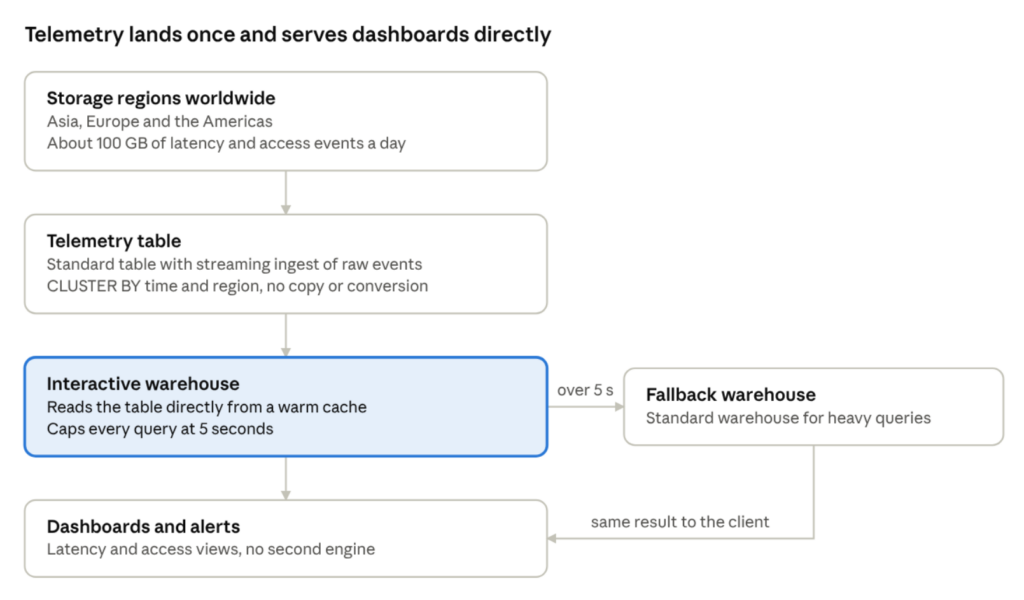
Raw events stream into a standard table clustered by time and region, the interactive warehouse reads it directly from a warm cache, and anything that runs past 5 seconds is retried on a standard warehouse.
-- 1. One table, clustered the way the dashboards filter
CREATE TABLE storage_events (
region        STRING,
event_ts      TIMESTAMP_NTZ,
latency_ms    NUMBER,
http_status   NUMBER,
access_key_id STRING
)
CLUSTER BY (DATE_TRUNC('hour', event_ts), region);
-- 2. Interactive warehouse that keeps it warm, with a fallback
CREATE INTERACTIVE WAREHOUSE telemetry_iwh WAREHOUSE_SIZE = 'SMALL';
ALTER WAREHOUSE telemetry_iwh ADD TABLES (storage_events);
ALTER WAREHOUSE telemetry_iwh SET FALLBACK_WAREHOUSE = analytics_wh;
-- 3. p99 latency by region, last 15 minutes
SELECT region, APPROX_PERCENTILE(latency_ms, 0.99) AS p99_ms
FROM storage_events
WHERE event_ts > DATEADD('minute', -15, CURRENT_TIMESTAMP())
GROUP BY region;
-- 4. Keys with repeated denied requests (threshold is illustrative)
SELECT region, access_key_id, COUNT(*) AS denied
FROM storage_events
WHERE http_status = 403
AND event_ts > DATEADD('minute', -15, CURRENT_TIMESTAMP())
GROUP BY region, access_key_id
HAVING COUNT(*) > 50;
One sizing note: at 100 GB a day, a 30-day window is roughly 3 TB before compression. At 300–400 MB/s, an XS warehouse could need a couple of hours to re-warm that after a resume, so run it continuously and expire old rows with a storage lifecycle policy.
The honest trade-offs
You trade some tuning control and query flexibility for one platform, one copy of the data and one governance model.
| Function | Dedicated ClickHouse cluster | Snowflake interactive warehouse |
|---|---|---|
| Operations | You run, scale and tune the cluster | Managed; you choose size, cluster keys and cluster count |
| Freshness | Inserts queryable within seconds | Reads your tables directly, so freshness follows your ingest pipeline |
| Long queries | Run as long as they need | Capped at 5 seconds, then retried on a fallback warehouse |
| Schema and DML | ALTER and mutations available | Normal table DML and schema changes, run from a standard warehouse; the interactive warehouse only reads |
| Cost shape | Fixed cluster cost | Effectively always-on: 24-hour minimum auto-suspend, 1-hour minimum per resume |
| Governance | A separate copy with its own access model | Same RBAC, masking and row access policies as the rest of the account |
Snowflake limits per the interactive analytics docs.
When to pick which
If the workload is selective, repetitive queries over recent data, interactive warehouses remove the second system. That describes most latency and access-anomaly dashboards, including the ones described above. A dedicated engine like ClickHouse still earns its keep when you need long ad hoc scans, heavy in-place mutation, or full control over how the engine is tuned.
For the regulated clients we work with at 7Rivers in insurance, wealth management and tax, governance tips the balance. Security telemetry about unauthorized access is itself sensitive, and keeping it under the same masking and row access policies as everything else means one less copy to audit.
Sources
- Zero-copy support for all table formats in interactive warehouses (GA), Snowflake release note, September 14, 2026
- Build a Real-Time BI Dashboard with Interactive Warehouses, Snowflake quickstart