

- Home
- Snowflake Marketplace
- Relay
Scheduled Snowflake Reports and Alerts, Delivered Where Your Teams Work
Available on Snowflake Marketplace. Runs entirely in your account. Use it on its own or as part of a 7Rivers engagement.
The Challenge
Snowflake Reporting Still Depends on Exports, Dashboards, and Logins
Your data is all in Snowflake. Getting answers to the people who act on them still runs on exports, inboxes, and logins.
Dashboards Nobody Opens
Reports Sent by Hand
Licenses Just to Look
Scripts Nobody Owns
Alerts Without Context
Insights That Arrive Late
Stop Making People Find Insights
Automated Report Delivery from Snowflake
People go find reports.
Search, filter, export, interpret. If they remember to look.
Reports find people.
Delivered on schedule to email, Teams, Slack, and PagerDuty.
From SQL to Inbox
How to Schedule Snowflake Reports in Four Steps
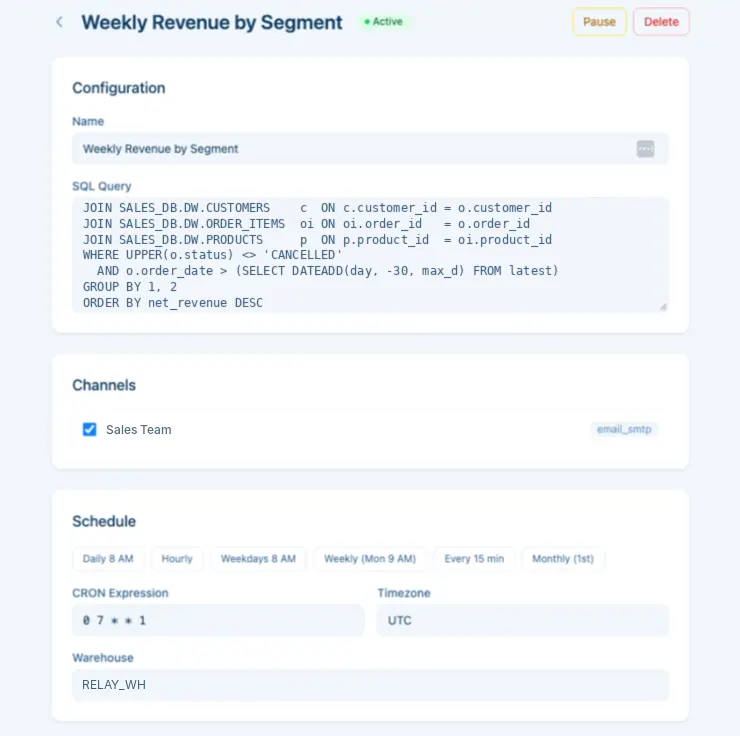
Connect
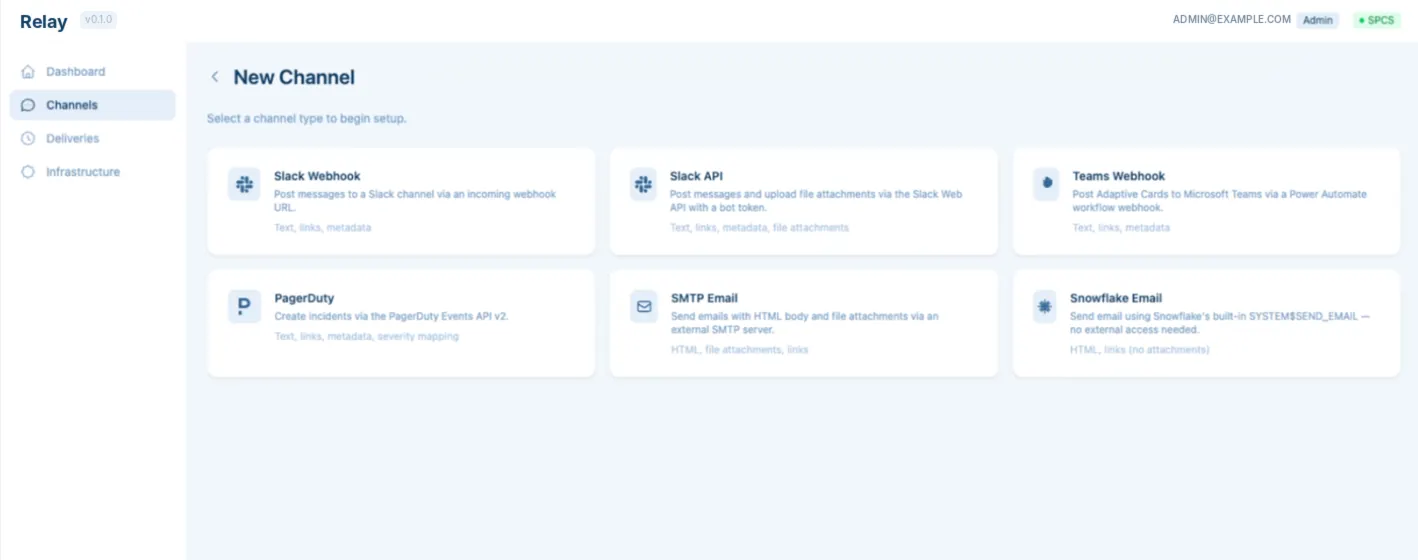
Add an email, Slack, Teams, or PagerDuty channel.
Define
Write the SQL report on the data you grant the app.
Schedule
Pick a preset or cron schedule in any timezone.
Deliver
Recipients get a summary plus CSV. No login needed.
One Answer, Wherever Your Team Works
Send Snowflake Reports to Email, Slack, Microsoft Teams, and PagerDuty
See what a Relay delivery looks like in each channel. Sample data shown is fictional.
Daily White Space Call List
Every weekday at 7:00 AM, each sales rep gets the existing customers most likely to buy next, joined from CRM and product data in Snowflake.
- Audience
- Account executives
- Format
- Summary + CSV
Good morning Jordan. These existing customers are most likely to buy next:
| Account | Next product | Score |
|---|---|---|
| Northwind Supply | Analytics Add-on | 92 |
| Bluebird Health | Premium Support | 88 |
| Copperline Foods | Analytics Add-on | 85 |
Microsoft Teams
Daily Sales Performance
Regional leaders see results vs. plan in their team channel each morning.
- Audience
- Sales leadership
- Format
- Adaptive Card + link
Slack
KPI Exceptions
When a metric crosses a threshold, the operations channel gets the stores or lines that caused it.
- Audience
- Operations
- Format
- Message + CSV
⚠️ Fill rate below 95% at 3 stores today.
- Store 114, Springfield: 91.2%
- Store 207, Lakeview: 92.8%
- Store 318, Riverside: 94.1%
PagerDuty
Data Freshness Alert
If a critical table stops updating, on-call engineers get an incident with the affected sources already listed.
- Audience
- Data engineering
- Format
- Incident with details
| Source | Last load | Expected |
|---|---|---|
| ERP_ORDERS | 3:41 AM | Hourly |
| WEB_EVENTS | 3:38 AM | Hourly |
Created by Relay with affected sources attached.
Built for Snowflake Admins
Snowflake Report Scheduling Features
- Multi-Channel Delivery - Email, Slack, Teams, and PagerDuty. One report, many channels.
- Custom SQL Reports - Any query on granted data, joins and aggregations included.
- Timezone-Aware Scheduling - Presets or cron, running as native Snowflake tasks.
- Summary Plus CSV - Results in the message with the full file attached.
- Branded Messages - Set sender name, reply-to, and footer so recipients know what to do next.
- Low Cost to Run - Small compute pool suspends when idle. Upgrades roll out automatically.
Secure by Design
A Secure Snowflake Native App: Your Data Stays in Your Account
Runs in your account
Snowflake Native App. 7Rivers never receives your data.
Snowflake Secrets
Credentials never shown in the UI or written to logs.
Approved outbound only
Relay reaches only destinations your admin allows.
Roles and audit log
Admin-only changes. Every attempt is recorded.
Why Relay
Relay vs. Manual Exports and BI Tools for Snowflake Reporting
Swipe the table to view more
Exports + Scripts | BI Tool Subscriptions | 7Rivers Relay | |
|---|---|---|---|
| Native to Snowflake | Partial | No | Yes |
| Recipients need a login or license | Varies | Often | No |
| Email, Slack, Teams, PagerDuty | Custom build | Varies | Built in |
| Credentials in Snowflake Secrets | Varies | No | Yes |
| Audit trail | Manual | External | Native |
| Ongoing maintenance | High | Medium | Low |
Get More from Snowflake
Business Value of Automated Snowflake Report Delivery
Relay delivers insights directly from Snowflake to the business, reaching more people while cutting cost and complexity.
Reduce Manual Reporting
Automate recurring reports, business updates, and notifications instead of exporting and emailing them by hand.
Extend the Reach of Snowflake Insights
Get answers to employees, partners, and other authorized recipients without Snowflake access or BI viewer licenses.
Rely Less on BI Tools for Distribution
Stop provisioning separate reporting platforms just to send information when interactive analytics aren’t required.
Lower Information Delivery Costs
Cut manual processes, avoidable licensing, and custom integration work, and get more from the Snowflake investment you already have.
See It in Action
Relay Demo: Schedule a Snowflake Report to Email and Teams
A two-minute walkthrough: connect a channel, define a delivery, set the schedule, and see it land.

Questions We Hear Most
Snowflake Scheduled Reports FAQ
Do recipients need a Snowflake account?
No. Anyone on an approved channel can receive deliveries.
Does my data leave Snowflake?
Queries and processing stay in your account. Only the delivered message and attachment go to the channel you choose. 7Rivers never receives your data.
Which channels are supported?
Email (any SMTP provider over TLS, including Microsoft 365, Gmail, Amazon SES, SendGrid, and Mailgun, or Snowflake email), Slack, Microsoft Teams, and PagerDuty.
How are credentials protected?
They're stored as Snowflake Secrets, never shown in the UI or written to logs.
What does it cost to run?
Relay uses a small compute pool that can suspend when idle. Queries consume Snowflake credits like any other workload.
Can partners or people outside our company receive reports?
Yes. Any authorized recipient on a channel your admin has approved can receive deliveries.
Do I need 7Rivers to use Relay?
No. You can install Relay from Snowflake Marketplace and run it on your own. 7Rivers can also configure and extend it as part of a broader engagement.
Does Relay replace my BI tool?
For distributing information, often yes: Relay delivers reports and alerts without a separate reporting platform or viewer licenses. Keep your BI tool for interactive analytics.
Part of the 7Rivers Agentic Harness
Snowflake Native Apps That Accelerate Every 7Rivers Engagement
Relay works on its own from Snowflake Marketplace, and it also strengthens the agentic harness our teams use to deliver faster and more repeatably: agents, accelerators, and native apps built from patterns proven across client work.
Secure RBAC Manager
Govern Snowflake role-based access control with drift detection, dry runs, and a full audit trail.
Explore Secure →Relay
Scheduled Snowflake reports and alerts, delivered to email, Slack, Microsoft Teams, and PagerDuty.
Work with Our Team
7Rivers experts configure, extend, and run these apps as part of your engagement.
Talk to Our TeamPick One Report Your Team Still Sends by Hand
Start Automating Snowflake Reports with Relay
Choose the report people chase every week and automate it this week.